Business management
Excel vs CMMS: Which is Better for Maintenance?
Excel is a simple, inexpensive program that can be used for very small upkeep tasks that only need to keep basic records. But as a company grows, it needs a Computerized Maintenance Management System (CMMS) to make sure that work orders are automatically processed
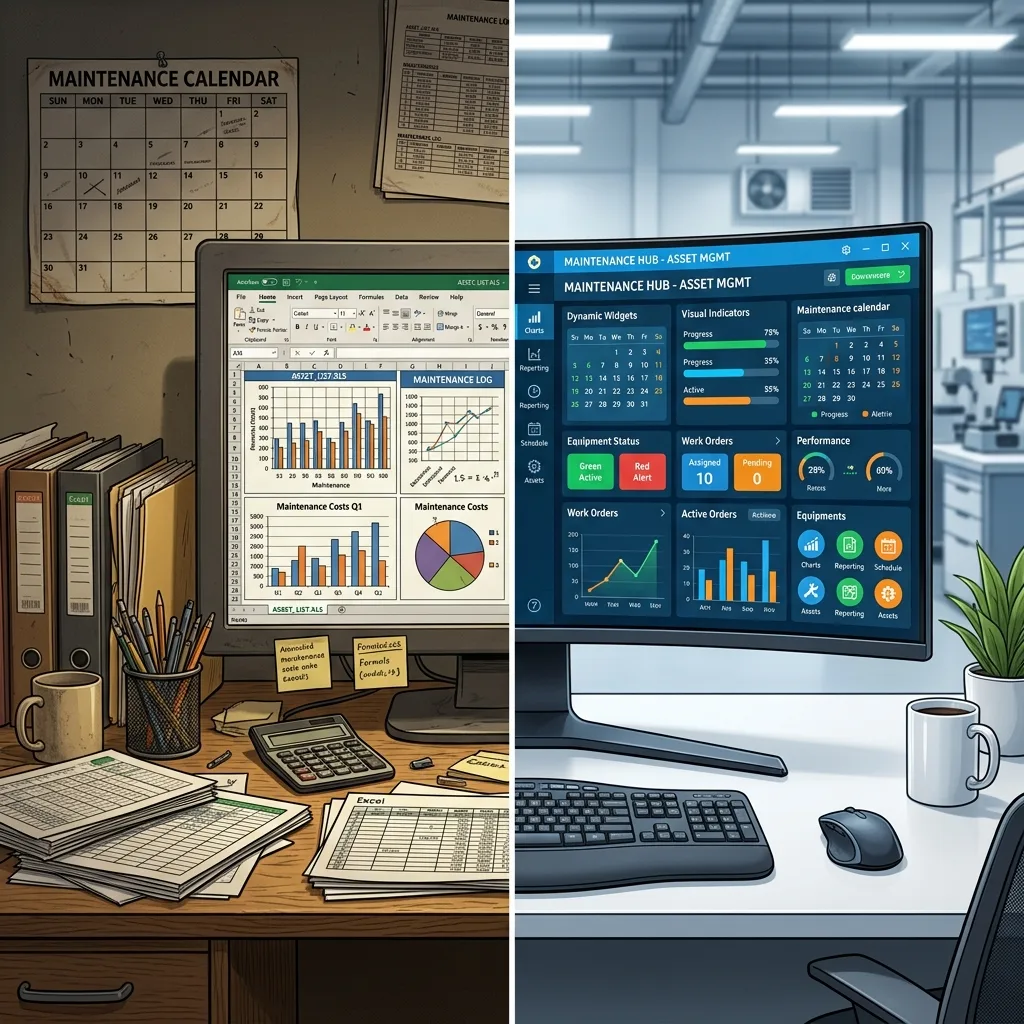
Quick answer: Excel is a simple, inexpensive program that can be used for very small upkeep tasks that only need to keep basic records. But as a company grows, it needs a Computerized Maintenance Management System (CMMS) to make sure that work orders are automatically processed, that data is correct, that inventory is tracked in real time, and that improved compliance reports are made.
Organizing many moving parts is part of managing repair operations. Things break down, preventive maintenance schedules need to be kept track of, and stock amounts are always changing. To keep things running smoothly, facility managers and maintenance teams need a method they can count on.
Spreadsheets have been used by businesses for decades to keep track of these daily tasks. Because it is easy to use, Microsoft Excel is still one of the most popular business tools around the world. Modern technology, on the other hand, has answers that are made just for this: computerized maintenance management system (CMMS) software. If you are new to this concept, you can first understand it in detail by reading what is CMMS before comparing it with Excel
The tool you choose has a direct effect on how productive your team is, how long your assets last, and how much it costs to run the business as a whole. Leaders can make better choices for their facilities when they know the clear differences between a simple spreadsheet and a dedicated CMMS.
What are the pros and cons of using Excel for maintenance?
Microsoft Excel is an easy-to-use spreadsheet program that can be used to enter data, do calculations, and keep track of things. This is where a lot of repair teams begin because the software is already on their work computers.
Pros of Excel:
Cost-effective: Most organizations already pay for Microsoft Office licenses. Using Excel doesn't require any extra program purchases.
Highly familiar: The vast majority of administrative professionals and managers already know how to navigate a spreadsheet. This familiar interface makes the initial teaching a lot faster.
Highly customizable: Users can build custom columns, color-code rows, and create formulas tailored to their specific facility requirements.
Cons of Excel:
Limited scalability: Spreadsheets become sluggish and difficult to read as you add thousands of rows of historical asset data.
Poor data integrity: Multiple users editing the same file often leads to accidental deletions, broken formulas, and version control issues.
No automated reporting: Excel can't make a compliance report and email it to stakeholders immediately. Someone must manually build graphs and charts.
Lack of mobility: Viewing and editing a massive spreadsheet on a mobile device while standing in front of a broken boiler is highly impractical for technicians.
What are the pros and cons of using CMMS software?
A Computerized Maintenance Management System (CMMS) is specialized software designed exclusively to centralize maintenance information and facilitate maintenance operations.
Pros of CMMS software:
Automated workflows: A CMMS automatically generates preventive maintenance work orders based on time intervals or meter readings, ensuring no critical tasks fall through the cracks.
High data accuracy: Cloud-based CMMS platforms provide a single source of truth. Multiple technicians can update work orders simultaneously without overwriting each other's data.
Advanced reporting: Maintenance managers can pull reports on Mean Time Between Failures (MTBF), inventory costs, and technician productivity with a single click.
Mobile accessibility: Modern CMMS platforms offer mobile apps. From their phones, technicians can scan QR codes on tools, share pictures of broken parts, and finish work orders.
Cons of CMMS software:
Initial software costs: Unlike a pre-existing spreadsheet, a CMMS requires purchasing a software subscription.
Implementation time: Setting up a CMMS involves migrating existing data, setting up asset hierarchies, and training the maintenance team to use a new digital interface.
When should a business choose Excel over a CMMS?
The choice between these two systems comes down to how big and complicated they are to run. Make the choice based on clear factors.
If you run a very small business with only one or two repair technicians, Excel is the best choice. If your main goal is to keep a static list of assets and keep track of fixes from time to time, a spreadsheet is a good, low-cost option. If maintenance isn't a must for your business and more of a hobby, Microsoft Excel is a great tool for you.
You should use a CMMS if your repair team is growing, you are in charge of more than one building, or you have to follow strict rules set by the government. A dedicated CMMS program is the best choice for businesses that need to keep track of their inventory in real time, give field technicians access from their phones, and schedule preventative maintenance automatically.
If your business loses a lot of money when equipment breaks down, the cost of a CMMS will be covered by the increased reliability of your assets.
How to choose between Excel and a CMMS for your facility
Take a close look at your budget, team size, and plans for future growth as you look at your current maintenance setting.
First, look at how many people are on your team. A spreadsheet could work for a single site manager. A CMMS is the only way for a group of five technicians who work different times to talk to each other from one place.
Next, look at the rules and regulations that apply to you. Strict audits are done at healthcare facilities, food processing plants, and manufacturing sites.
A CMMS keeps an electronic record of all finished work orders and inspections, which can be checked. Putting together the same audit record in Excel takes hours of work by hand, and mistakes can happen.
Lastly, compare your budget to the money you could save. A CMMS costs money every month or yearly, but it saves money on fixes by making sure that routine maintenance is done on time. To figure out your possible return on investment, compare the cost of one big piece of equipment breaking down to the cost of the software a year.
Upgrade your maintenance strategy today
Using spreadsheets that you have to fill out by hand limits what your maintenance staff can really do. Excel is a good place to start, but you need specific tools to make your maintenance business reliable and efficient as you grow it.
CMMS software gives technicians mobile data that they can use, gives managers insights that they can act on, and eventually makes your most valuable equipment last longer.
Are you ready to see how dedicated repair software changes the way things are done every day? Today, you can set up a free demo of our CMMS platform, which is the best in the business, or you can call our implementation experts to get a personalized consultation.
Keep reading
More from the Mantrix blog

Parking Lot Maintenance: Save Money with Preventive Care
A proactive parking lot maintenance strategy helps prevent potholes, cracks, drainage issues, and costly repairs. This guide explains preventive maintenance, common parking lot problems,

Agtech Farm Equipment Maintenance: Common Challenges and How to Solve Them
Farm equipment maintenance is becoming more complex as modern machinery evolves. Learn how digital maintenance systems, preventive scheduling, and agtech solutions can reduce downtime and improve equipment reliability.
Elevator Maintenance Software in Pakistan: Handling Assets, Work Orders, and Inspections
Discover how elevator maintenance software in Pakistan helps facility teams manage assets, inspections, work orders, maintenance records, and multiple properties.